Teach Me How to Dougie AI
Upload one photo of an adult and make a short vertical clone-dance video in the Teach Me How to Dougie AI style.
Vertical 9:16 video
15 credits · from $8.00 per video (10-video pack) · See pricing
By clicking the button, you agree to our Terms.
Want the trend sound? Add it yourself in TikTok when you post.
Empty scene plates: reference credits.
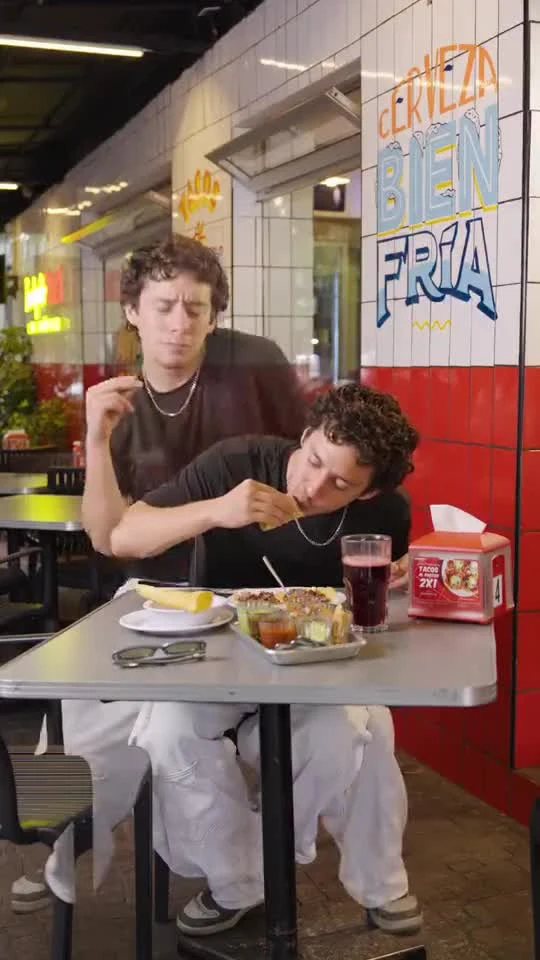
What is the Teach Me How to Dougie AI trend?
Teach Me How to Dougie AI is for a diner clone-dance joke: one person stays calm at a taco table while see-through copies of them groove in the back. People also call it a ghost clone dance or a soul-leaving-the-body dance clip.
This page turns one adult photo into a short vertical video in that clone-dance style. Your result is AI-generated and ready for TikTok, Reels or Shorts.
How to make a Teach Me How to Dougie AI video
No app and no prompt to write. Teach Me How to Dougie AI works in your browser.
Upload your photo
Upload a clear photo of just you, one adult, face toward the camera. Waist-up or full body both work.
Confirm who is in it
Tick the box to confirm the photo shows you, or an adult who agreed. Photos of anyone under 18 are not allowed.
Press the button
Teach Me How to Dougie AI builds a short vertical diner clone-dance video from your photo.
Download and post
Save the video and post it to TikTok, Instagram Reels or YouTube Shorts. Keep the platform AI label on. Add the trend sound yourself when you post.
Photo rules for Teach Me How to Dougie AI videos
You, or an adult who agreed
Upload a photo of yourself, or of an adult who has said yes to being in the video.
No photos of children
Photos of anyone under 18 are not allowed.
No photos without consent
Do not upload someone else's photo without their permission, or use the video to embarrass or harass anyone.
No sexual content
Nude, sexual or suggestive photos are not allowed. The full rules are in our Terms and Acceptable Use Policy.
Teach Me How to Dougie AI FAQ
What is Teach Me How to Dougie AI?
Teach Me How to Dougie AI is an online AI video maker for the diner clone-dance style: you upload one photo of yourself, and it makes a short vertical video where solid you stays at the table while see-through copies of you dance behind.
How many photos do I need?
One photo of one adult. A clear front-facing face works best because several copies appear on screen.
Teach Me How to Dougie AI vs a general AI video generator: which should I use?
Use Teach Me How to Dougie AI if you want this clone-dance style itself—the diner joke is already set up, so you upload a photo and there is no prompt to write. Use a general AI video generator if you want a different scene or your own story. Each video uses 15 credits, and credits are returned if a generation fails.
What kind of photo should I use?
A sharp photo of just you, one adult, face clearly visible and good light. Avoid sunglasses or a hat that hides the face.
Can I post my video on TikTok?
Yes. Download it and post it to TikTok, Instagram Reels or YouTube Shorts. Keep the platform AI label on, and add the trend sound yourself when you post.
More from Parrot Dance AI
Ba Ba Ba Dance AI
Turn two adult photos into a viral duo dance video in the ba ba ba style.
Try Ba Ba Ba Dance AICatel Dance AI
Turn one photo into a sunny courtyard dance video in the Catel style.
Try Catel Dance AIGimme Purr Gimme Meow AI
Turn one full-body photo into a high-angle outfit-check video.
Try Gimme Purr Gimme Meow AIParrot Dance AI
Turn one photo of your pet or yourself into the parrot dance video from TikTok.
Make a parrot dance video